A thoughtful gaming gift can make a familiar setup more comfortable, immersive, or ready for streaming. These nine ideas cover a range of interests and gifting budgets.
Before choosing a desk accessory or connected device, consider the recipient’s existing equipment, available space, and the kind of games they play.
9 Gift Ideas for Gamers and Their Setups
HUANUO FlowLift Dual Monitor Stand

- Each arm supports a monitor weighing 4.4 to 19.8 lbs, with screens measuring 13 to 32 inches and VESA mounting holes.
- Offers tilt, swivel, and rotation adjustments for changing screen positions.
- Lifts screens off the desk and routes cords along the arms.
Best Gift For: A PC gamer who wants to adjust two compatible screens and free up desk space.

Valerion VisionMaster Pro2 4K Projector
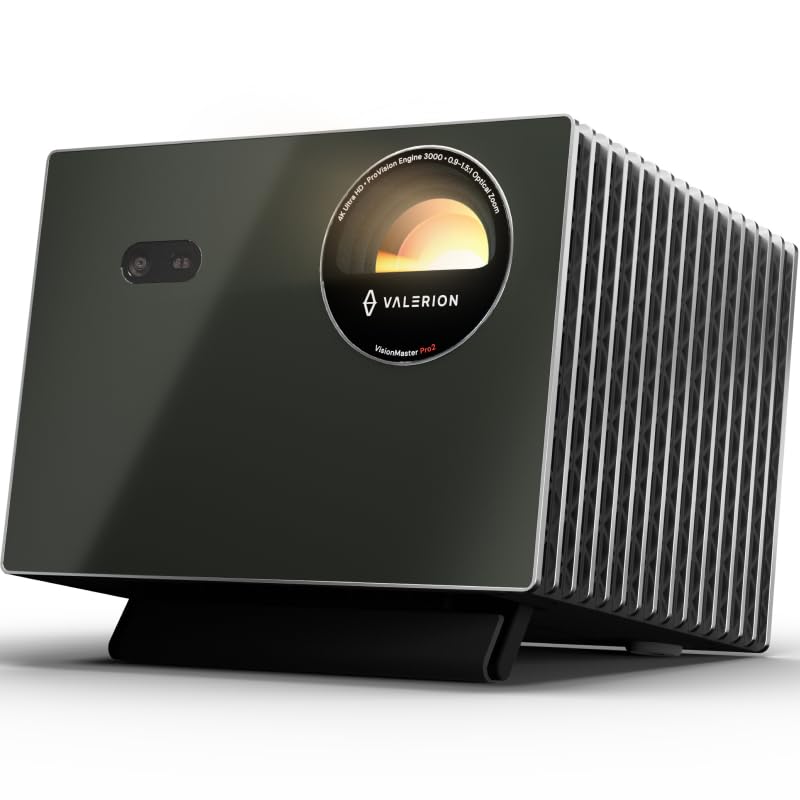
- Supports 4K UHD picture with HDR10+ dynamic tone mapping.
- Offers a gaming mode with 4ms input lag and a 240Hz refresh rate.
- Includes Google TV and voice control options.
Best Gift For: A gamer who wants a large projected image for games and movies.
SteelSeries Arctis Nova 7P Wireless Headset

- Connects wirelessly to PC, PlayStation, Switch, or a tablet.
- Combines game audio with calls or music from a connected mobile device.
- Has a 38-hour battery and USB-C fast charging.
Best Gift For: A console or PC gamer who wants wireless game audio and a retractable mic.
FIFINE AmpliGame AM8 White Gaming Microphone

- Supports USB and XLR connections for different audio setups.
- Has a tap-to-mute control, gain knob, and headphone jack.
- RGB lighting can be changed or turned off when connected by USB.
Best Gift For: A gamer who streams, records voiceovers, or chats at a desk.
TP-Link Archer AXE75 WiFi 6E Router

- Tri-band WiFi 6E supports simultaneous gaming, streaming, and browsing.
- The 6 GHz band is intended to support responsive gaming and video calls.
- Supports a OneMesh network with a compatible TP-Link extender.
Best Gift For: A gamer whose household wants a router for gaming, streaming, and multiple connected devices.
SteelSeries Apex Pro HyperMagnetic Gaming Keyboard

- Offers 40 levels of per-key actuation adjustment.
- Allows two actions to be assigned to the same key.
- The OLED display shows information from games and apps.
Best Gift For: A PC gamer who likes adjusting keyboard response and assigning actions to keys.
Nylavee Desktop PC Speakers

- Includes six touch-controlled lighting modes.
- A single knob turns the speakers on or off and adjusts volume.
- Uses USB for power and a 3.5mm cable for audio.
Best Gift For: A gamer who wants wired stereo sound and customizable lighting at a desk.
SteelSeries Aerox 3 Wireless Gaming Mouse

- The shell design weighs 68g.
- Supports wireless connections over 2.4GHz and Bluetooth 5.0.
- Its three-zone RGB lighting offers configurable colors.
Best Gift For: A PC gamer who prefers a lightweight wireless mouse with configurable lighting.
Nulaxy Pull-Out Height Adjustable Laptop Stand

- Adjusts laptop screen height for seated or standing desk use.
- Folds down for storage and portability.
- Supports up to 22 pounds.
Best Gift For: A gamer who plays on a laptop and wants to raise its screen at a desk.
1. Choose gifts for gamers around their setup
When choosing gifts for gamers, start with how the recipient plays. A dedicated PC player may appreciate a change to their desk or controls, while someone who shares a living room may value gear that fits around a console and other household devices.
Think about what they already own before picking a connected accessory.
Consider their usual session, too. A headset may suit late multiplayer games where voice chat matters; a microphone makes more sense for someone who streams or records.
A projector changes the scale of a play space, so it is best for someone with room to arrange a larger viewing area.
The least risky choice often complements a known habit. If you have seen them adjust their monitors, complain about desk clutter, or talk about starting a stream, that detail can guide your choice.
If not, ask a friend or family member which setup they use.
2. Match the gift to your budget
Gaming accessories span modest desk additions to major entertainment upgrades. Set a comfortable spending limit first, then compare gifts that solve a similar need.
A practical desk accessory may be a better fit than a large device if the recipient has not asked for a room-scale change.
For more expensive electronics, check the recipient’s current equipment and intended use before buying. Confirm compatibility with their computer or console, network setup, and available space.
Also review current prices and return terms so the gift fits your budget and their circumstances.
A modest gift can still feel personal when it reflects how someone plays. Pair a useful accessory with a handwritten note about a shared session or a game they enjoy.
The thought behind the choice often matters more than making the purchase the centerpiece.
3. Personalize gifts for gamers
Gifts for gamers feel more considered when they reflect a specific routine. A person who streams may value tools for speaking clearly, while a late-night player may appreciate a way to keep audio focused.
Choose around what they actually do, rather than assuming every gamer wants the same upgrade.
You can add a personal touch without guessing at technical preferences. Include a note about why you picked the gift, or package it with a favorite snack or a card for a game night.
For a group gift, ask the recipient’s close gaming friends what would complement their setup.
Presentation can make a practical item feel celebratory. Wrap it with a small printed invitation to play together, or create a simple theme around their favorite genre using colors and paper.
Keep the packaging easy to open and preserve the product box in case they need to check fit or compatibility.
4. Check the details before checkout
Gaming equipment depends on connections and space, so check the details that could turn a thoughtful gift into a hassle. Verify ports, platform support, desk or room dimensions, and whether the recipient already has the accessories needed to use it.
For audio gear, make sure its connection type suits their setup.
For mounts and stands, compare the product’s fit requirements with the recipient’s screen and furniture. For network equipment, check that it works with the household’s existing internet arrangement.
These are quick checks that help keep the gift useful after the wrapping comes off.
If the recipient is particular about their setup, consider sharing the idea beforehand or choosing from a wishlist. That small step can confirm preferences and avoid duplication.
Keep receipts and packaging accessible in case the item does not fit the way they expected.
5. Plan for a smooth handoff
For a deadline, look at current delivery estimates at checkout and allow time for packing or travel. Delivery options can change, so avoid relying on a product arriving by a particular date until the estimate is confirmed for your address.
If timing is tight, a card explaining a planned gift can still mark the occasion.
A digital note or printed picture can stand in for a larger present when shipping schedules are uncertain. You can make it feel intentional by writing what you chose and why, then let the recipient help confirm compatibility before the final purchase.
That is especially useful for gifts tied to a specific platform or desk setup.
Before wrapping, check the box contents and keep any setup instructions together. Add a short message that offers help with arranging the new gear, without assuming they need it.
A relaxed handoff leaves room for the recipient to integrate the gift into the way they already play.